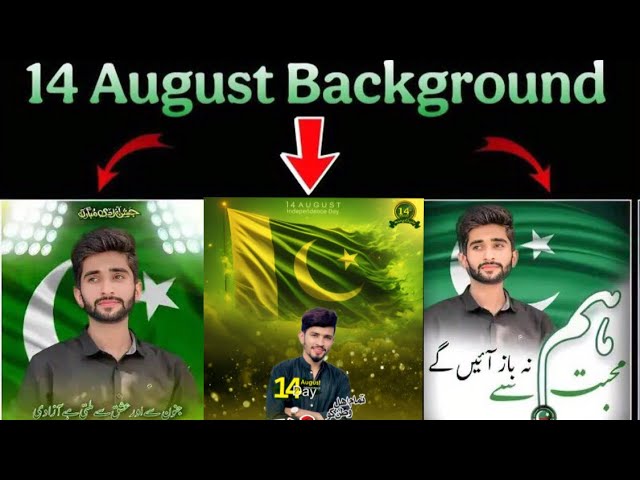
In today’s guide, we’ll show you how to use WhatsApp’s newly introduced Meta AI photo filter to create stunning custom images — perfect for celebrating Pakistan’s Independence Day on 14th August. Using a few simple prompts, you can transform your photos into high-quality HD pictures with themed outfits, backgrounds, and even text overlays.
What is the Meta AI Feature in WhatsApp?
Meta (formerly Facebook) has integrated a powerful AI assistant directly into WhatsApp. This new AI filter allows users to generate creative edits by simply typing prompts. Whether you want to change your outfit, background, or convert your image to HD — it’s all possible within WhatsApp itself.
Step-by-Step Guide to Use Meta AI in WhatsApp
Let’s walk you through the process of creating a custom 14th August-themed image using Meta AI inside WhatsApp.
- Open WhatsApp on your device and look for the “Meta AI” option. This should be visible in your chat list or by tapping on the search bar.
- Click on Meta AI and open the conversation window.
- Next, tap the camera icon and take a photo or select an existing photo from your gallery.
- Once your photo is uploaded, type the following prompt:
“My outfit should change to 14 August shirt.”
The AI will process the image and send you back a version with a green and white Independence Day shirt.
Change the Background with Pakistani Flag
Now that you’ve added the outfit, let’s go one step further and change the background to something more patriotic.
- Forward the same edited image back to the Meta AI chat.
- Type this command:
“Change my background to Pakistani flag.”
Within seconds, your image will come back with a beautiful green and white flag as the backdrop.
Add 14th August Text in the Background
To make your edit even more personalized, add a text prompt that includes the date and country name:
“Type 14 August Pakistan in the background.”
The AI will automatically render this text in the image’s background in a visually pleasing way. This is ideal for posting on WhatsApp Status, Facebook, or Instagram to celebrate Independence Day.
Add Iconic Landmarks Like Minar-e-Pakistan
Want to include Pakistan’s iconic landmarks in your image? Just follow this step:
“Minar-e-Pakistan sticker adjust in background.”
The AI will seamlessly add a sticker or logo of Minar-e-Pakistan in your photo’s background, giving it a patriotic and visually impressive look.
Convert Your Image to HD
If your image looks blurry or low resolution, you can enhance it using the HD conversion option:
“Convert in HD photo.”
The Meta AI will return a high-definition version of your edited picture. This is especially useful if you plan to print the image or use it on high-res displays.
Why This Feature is Game-Changing
WhatsApp has introduced this AI functionality to compete with other AI photo apps like PhotoRoom, Removal.AI, and Kaiber AI. But the advantage here is that you don’t need to download a separate app — it’s all embedded inside WhatsApp, making it easier and faster to use.
This feature is perfect for:
- Creating custom images for Independence Day (14th August)
- Designing WhatsApp status photos or social media banners
- Sending creative photos to friends and family
- Enhancing photo quality with just a text prompt
Final Thoughts
The Meta AI feature in WhatsApp is one of the easiest tools to generate high-quality AI edits without needing any technical skills. You just upload your photo, type a command, and the AI does the rest — outfit changes, background swaps, text overlays, and HD enhancements.
It’s a fun and creative way to celebrate national events like 14th August or even personalize your everyday photos. We highly recommend exploring this feature and sharing your results with friends.
If you’re looking to explore more AI-powered tools, check out these resources:
- CapCut – For AI-powered video editing
- LightX – For mobile photo editing and AI filters
- Download WhatsApp – Ensure your app is updated to use Meta AI
Watch More Tips Like This
We’ll be sharing more exciting WhatsApp AI tricks, Independence Day edits, and AI-based tools in upcoming posts. If you’re new to the blog or channel, don’t forget to subscribe and press the bell icon for updates.
🎨 Love Photo Editing & AI Prompts?
Join our WhatsApp Channel to get the latest AI art prompts, editing tips, and exclusive resources!
👉 Join Now on WhatsApp