How to Recreate Akshaye Khanna’s Viral Pose Photo Using Google Jin App
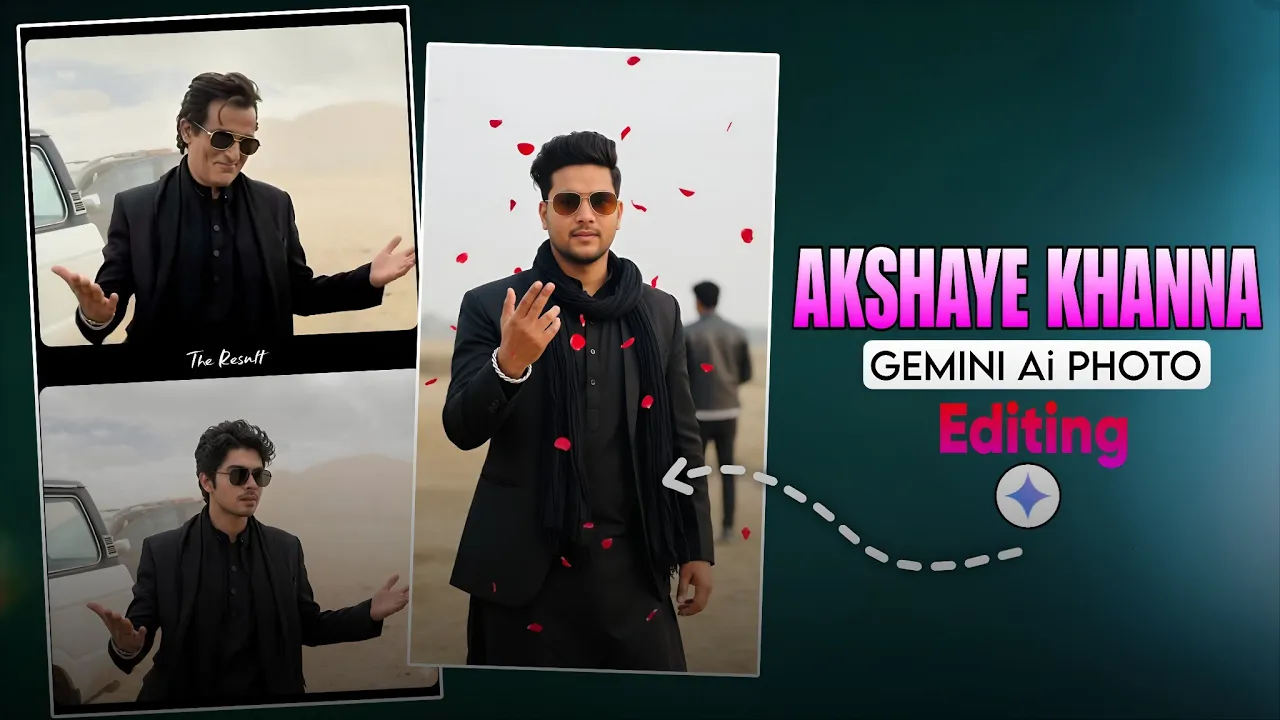
Okay guys, so recently the Dhurendra movie featuring Akshaye Khanna has gone viral, and one specific pose photo of his is trending everywhere on Instagram Reels. The best part? You can recreate the exact same pose with matching outfit and face style using just your mobile phone.
In this blog, I’ll show you exactly how to create this trending Akshaye Khanna-style photo using the Google Jin app. So let’s start the tutorial — and yes, don’t forget to subscribe to the channel!
Step 1: Download the Google Jin App
First, open your mobile and head straight to the Google Play Store. Search for Google Jin and download the app.
After downloading, open the app and log in. You will see a login icon at the top — just tap it and sign in.
Step 2: Upload Your Photo
Once you’re inside the app, click on the plus (+) icon and then tap on the gallery icon.
Here, upload a normal picture of yourself — make sure your face is clearly visible. A clean, front-facing photo works best.
I have used this photo shown below in the video. Try to pick a good-quality image for better results.
Step 3: Paste the Front Image Prompt
Next, you need to paste the front prompt in the input box. The link to the prompt is usually provided in the description — just copy it from there and paste it into the app.
Prompt:
A charismatic, young man with dark,slicked-black hair and gold-rimmed aviator sunglasses. He is wearing a stylish black suit jacket over a black traditional tunic (shalwar kameez). He has a slightly smirking or confident expression and is gesturing outwards with both open palms in a ‘what can you do? pose. He is standing in a dusty, desolate desert or mountainous terrain. luxury SUV is parked behind him. The background is dusty with soft cloudy skies and muted beige tones. Cinematic lighting, shallow depth of field, realistic photography, 4K ultra-detailed, moody Bollywood movie scene, dramatic atmosphere, professional color grading. Preserve Face 100%, I want 100% same face as in the reference image no alteration
Once pasted, you will see a Send icon. Simply tap it.
Step 4: Wait for the AI to Generate Your Image
After you tap Send, wait for a minute or two. The app is pretty fast and usually generates your new photo in less than 2 minutes, depending on your internet speed.
You’ll see a loading icon for a few seconds, and then—boom—you’ll get your AI-generated image.
The result looks incredible. The AI gives you:
- The same outfit as Akshaye Khanna
- A matching facial style
- Background elements similar to the original pose
- Extra effects like flowers, props, or cars based on your input image
In my case, the AI even kept the car visible in the background because my uploaded photo had one.
Step 5: Download Your Final Image
Once your final image appears, just tap the download icon. The photo will instantly save to your phone’s gallery.
That’s it! Your Akshaye Khanna-style viral Instagram pose is ready to upload.
Helpful External Tools
- Remove.bg – Remove backgrounds easily if needed.
- Canva – Add filters, enhance lighting, or style your photo.
- Google Apps on Play Store
Final Thoughts
This method is super easy and anyone can recreate the viral Akshaye Khanna pose photo using Google Jin. Just upload your clear photo, paste the prompt, and let AI do its magic.
Try it out and share your results — who knows, your reel might go viral next!